

Keyword Research Guide for Better Product Ideas
Use QName AI to compare Google Ads search volume, competition, USD bids, and monthly trends, then filter and export product ideas.
Product ideas are easy to collect. Deciding which one deserves your time is harder. Keyword research turns a vague belief that people need something into a set of search signals you can compare: the words people use, estimated search volume, advertiser competition, top-of-page bids, and changes in demand over time.
QName AI Keyword Research uses Google Ads keyword data. You can expand seed keywords or generate ideas from a public website. Results show bids in US dollars and place the keyword table beside a 12-month search trend, making the workflow useful for independent developers, SEO practitioners, and small product teams.
This guide uses the live product interface and a real query. Google Ads estimates change by market and over time, so the numbers in the screenshots represent the query when it was run.
Choose keyword expansion or website mining
Start by choosing a keyword input mode.
- Keyword expansion works when you already have a product direction. Enter keyword phrases a customer might search for, such as
AI Video Generator,AI Image Generator, orvideo translator. - Website mining works when you have a landing page or a competitor URL. QName AI reads public page content and generates related keyword ideas. It does not report the website's organic rankings.
You can enter up to 10 seed keywords. Press Enter or type a comma to add one. Press Ctrl/⌘ + Enter to run the keyword query, or use the search button. Start with two or three closely related phrases so that one result set does not mix unrelated keyword intents.
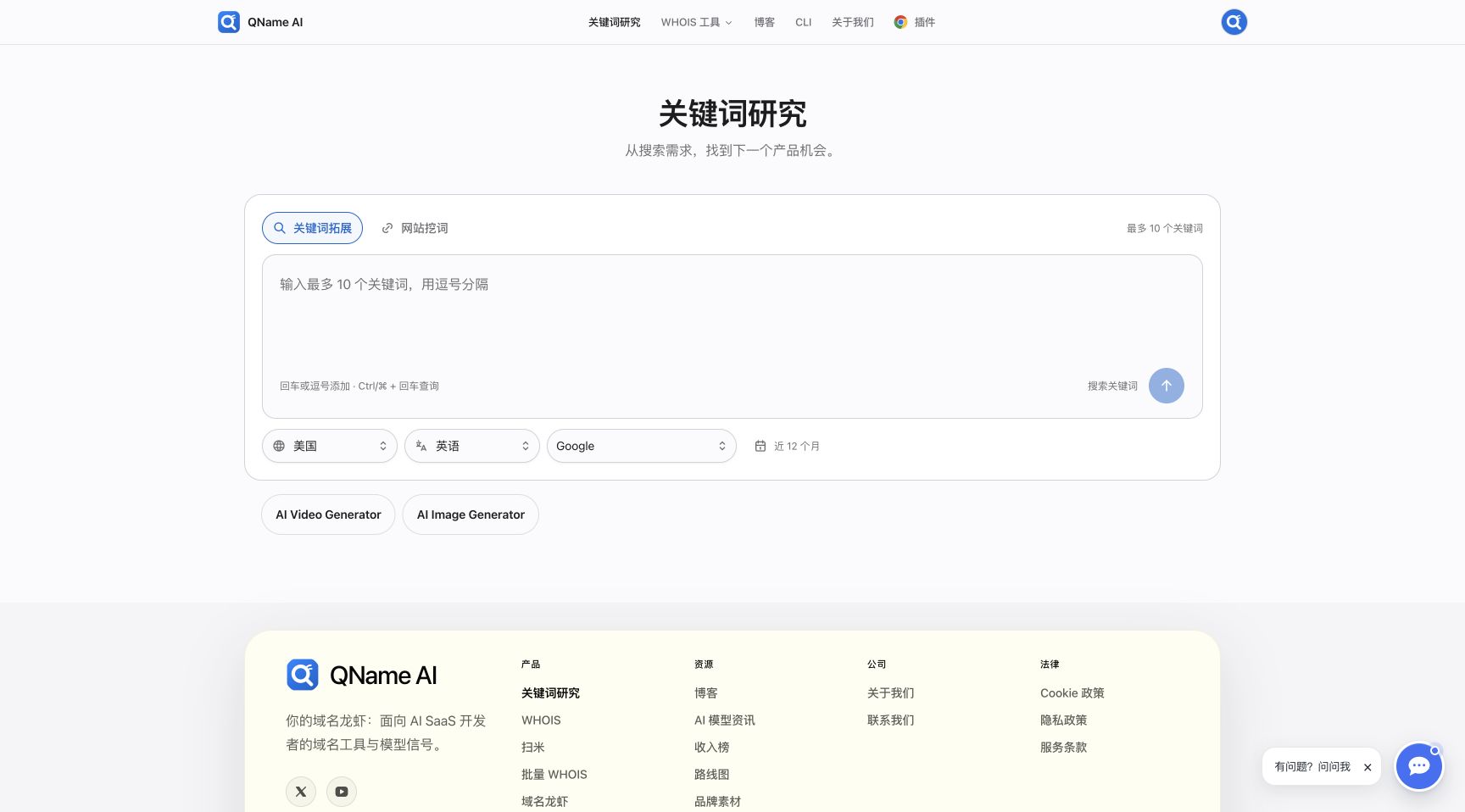
Live interface in Chinese: the example buttons below the input add AI Video Generator or AI Image Generator as a seed keyword.
Set the keyword market, language, and search network
The same phrase can have very different demand in different markets. Check three settings before submitting a query:
- Country or region defines the target market for the estimates.
- Language should match the language of your customers and landing page.
- Search network is currently Google. The product shows estimates for the latest 12-month period.
Choose the keyword market you can actually serve. A large global number is less useful than a smaller estimate tied to a specific language, price, and acquisition plan.
Visitors who are not signed in complete a Cloudflare check for each query. Signed-in users can query directly. Authentication changes the verification step, not the Google Ads metrics returned for identical settings.
Read the keyword research suggestions table
The sample keyword search for AI Video Generator returned 421 available suggestions and loaded the first 100. The keyword table combines four signals:
| Metric | How to interpret it |
|---|---|
| Keyword | A phrase people may actually search, useful for finding product, feature, and buying-intent language |
| Average monthly searches | The 12-month average, useful for relative comparison but not a traffic forecast |
| Ad competition | Competition among Google Ads advertisers, not an SEO difficulty score |
| Top-of-page bid (USD) | Low and high estimates for top ad placement, useful as a commercial-intent signal |
In the live result, ai video generator showed 246,000 average monthly searches, medium ad competition, and an estimated USD 1.43 to USD 5.91 top-of-page bid. free ai video generator showed 90,500 searches, while ai video creator had high ad competition. These differences help separate broad category demand, free-user intent, and terms closer to a purchase decision.
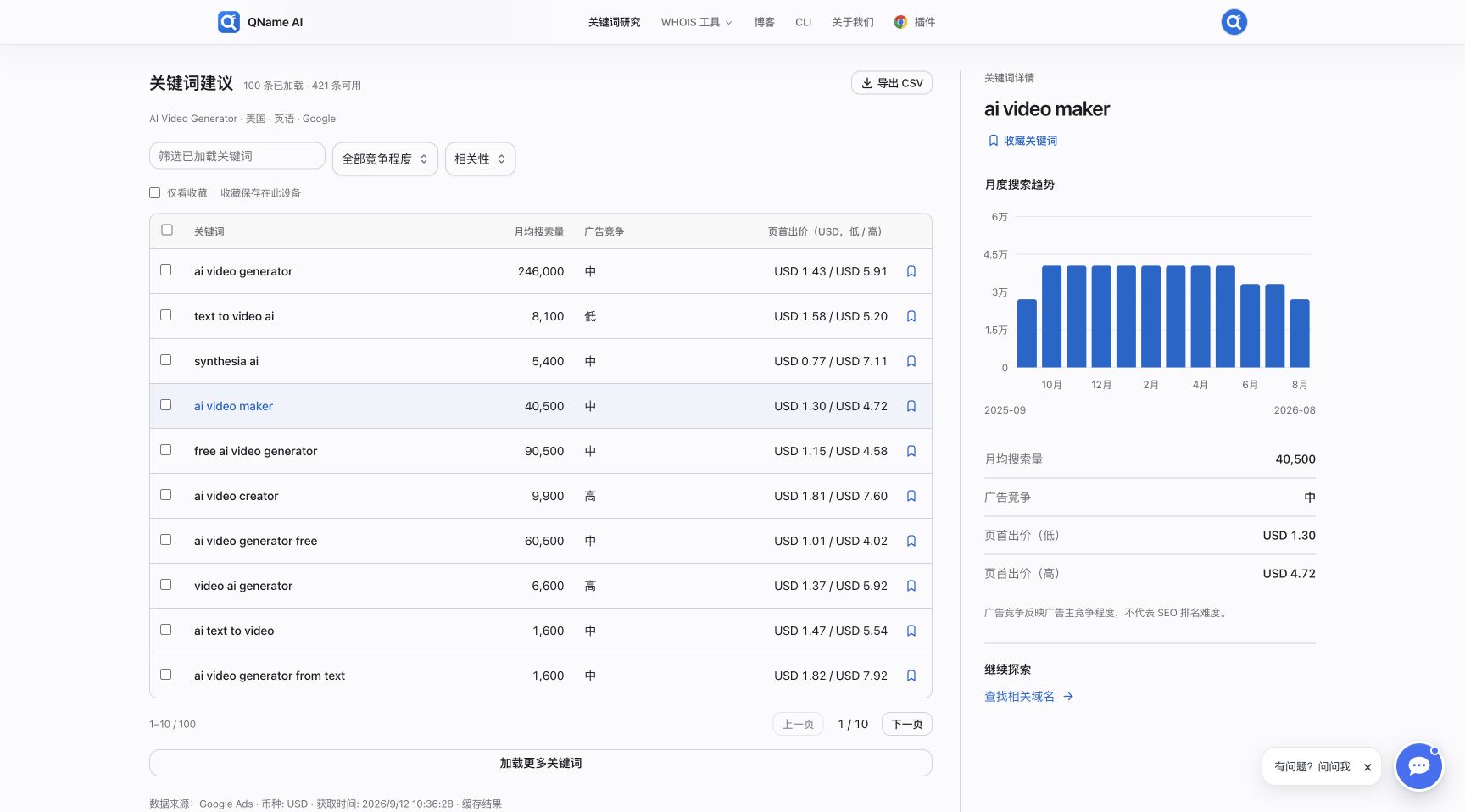
Live query result in Chinese: selecting any row updates the keyword details and 12-month chart on the right. Data was retrieved on September 12, 2026.
Inspect each keyword's monthly demand
An average hides month-to-month movement. Select any keyword row in the suggestion table to update the chart, average search volume, competition, and bid range in the right panel.
Hover over a bar to see the exact value for that month. Use the chart to ask whether demand is stable, rising, declining, or driven by a short-lived event. A recurring seasonal peak may also affect when you should launch content or run ads.
The selected ai video maker example averaged 40,500 monthly searches. Most months were near 40,500, with lower months around 33,100 or 27,100. That pattern says more about stability than the average alone.
Filter, save, and export candidates
Large keyword result sets are easier to review in stages. Filter by a feature or intent term such as free, text, or maker, then narrow by ad competition or relevance. Use Load more keywords when the first 100 suggestions are not enough.
Bookmarks keep a short keyword candidate list on the current device. Checkboxes help with bulk selection. Export the keyword result to CSV when you want to add columns for user intent, target page, validation status, and next action.
A practical candidate list usually contains three groups:
- Category terms, such as
ai video generator. - Feature and input terms, such as
text to video ai. - Price and comparison terms containing words such as
free,online,best, oralternative.
Turn keyword signals into a product decision
Keyword research is evidence for a market hypothesis, not proof that a product will succeed. Continue from the keyword evidence with a repeatable validation sequence:
- Query three to five seed terms across distinct user intents.
- Remove brand navigation terms, ambiguous phrases, and high-volume terms your product cannot satisfy.
- Compare volume, competition, and USD bids to find topics with clear demand and a result you can deliver.
- Review the monthly chart and flag one-month spikes or sharp recent declines.
- Inspect the live Google results to learn whether users expect a tool, guide, template, list, or video.
- Validate the underlying problem through interviews, community questions, competitor reviews, or a focused landing-page test.
AI Video Generator has broad demand and many competitors. text to video ai describes an input method, while free ai video generator reveals a pricing expectation. Mapping those intents to separate features and pages is more actionable than treating every search as the same audience.
Frequently asked questions
Where does the data come from?
Search volume, ad competition, top-of-page bids, and monthly trends come from Google Ads historical estimates. Google Ads can group close variants, so use the numbers to compare demand rather than predict exact visits.
Why are bids shown in US dollars?
QName AI presents top-of-page bid estimates in USD so markets are easier to compare. A bid is neither a guaranteed cost per click nor a recommended product price.
Does high ad competition mean SEO will be difficult?
No. Ad competition describes advertisers competing in Google Ads. SEO difficulty also depends on the pages ranking today, their authority, content format, brand concentration, and search intent.
What does a dash mean?
A dash means the source did not return that metric. Treat it as unknown, not zero, and look for supporting evidence before discarding or prioritizing the keyword.
How many seed keywords should I use?
The limit is 10, but two or three closely related seeds usually produce a clearer first pass. Separate different intents into different searches so you can compare the result sets.
Open QName AI Keyword Research and run a live search with AI Video Generator or AI Image Generator to start evaluating your next product direction.